App analytics,
without
surveillance.
See how your app performs in the real world without tracking anyone. Setup is two calls to the open SDK — wire it in yourself, or point your coding agent at the guide every SDK ships with. Trackless stores aggregate counts only — no identifiers, no cookies, nothing personal — which is why a whole app's production reality is small enough to read on the dashboard, or to paste into the agent that already knows your code. Free for 100,000 events a month, no credit card.
Analytics that can't spy on your users. Even if you wanted it to.
Privacy here is not a policy promise — it is the architecture. It is what everything else rests on, and it is enforced in what we refuse to store.
No consent banner needed*
SDKs use zero cookies and zero client storage. ePrivacy Article 5(3) consent requirements do not apply.*
No ATT prompt*
Apple's App Tracking Transparency prompt is for apps that track. Trackless has no user or device identifier to track with, so there is nothing to ask permission for.*
Automatic PII guard
Every SDK strips emails, phone numbers, and SSN patterns from event fields before data leaves the device. Defense in depth, not just policy.
GDPR, CCPA, and ePrivacy compliant by architecture across jurisdictions.* DPA available for all customers, and full data export and account deletion on demand.
The full architecture is in the privacy whitepaper. What it means for your app's compliance is in the privacy guide.
* Compliance statements reflect our assessment of the product's architecture and are not legal advice. You should consult qualified legal counsel in your jurisdiction to determine whether Trackless Telemetry meets your specific regulatory obligations.
How it works
Three steps. Trackless counts; you decide — with or without an agent.
Add the SDK — by hand or by agent
Two calls is the whole SDK — wire it in yourself and instrument exactly what you care about. Or point your coding agent at the guide every SDK ships with, and instrumentation is its job, not your afternoon. Either way, you decide what gets counted.
https://github.com/trackless-telemetry/sdk-swift
Trackless.configure(apiKey: "tl_your_key")
Ship a version. Counts accumulate.
Real usage arrives as aggregate counts and digests — what was used, what was slow, what broke — never as individual records. Nothing to watch, nothing to configure: the counts build while your app is simply out there.
Trackless.feature("export", "csv");
Trackless.view("settings", "notifications");
Trackless.performance("api_load", 0.142);Read the counts — or hand them to your agent
Review the counts on the dashboard — what's used, what's slow, what broke. Or press one control and hand your agent a context pack: the counts for the window and slice you chose, with instructions for reading them. You and your agent have what Trackless deliberately lacks — your codebase, what shipped on Tuesday, which number matters this quarter. The pack adds the one thing missing: production.
Then the loop closes on your side: whoever read the counts — you at the dashboard, or the agent that edits your code — turns them into diffs that ship in the next version and show up in the next counts. Trackless supplies the counts and the handover — the rest is your workflow. See what's in a pack →
What you can measure
Eight questions you can answer from aggregate counts alone. No user-level tracking required.
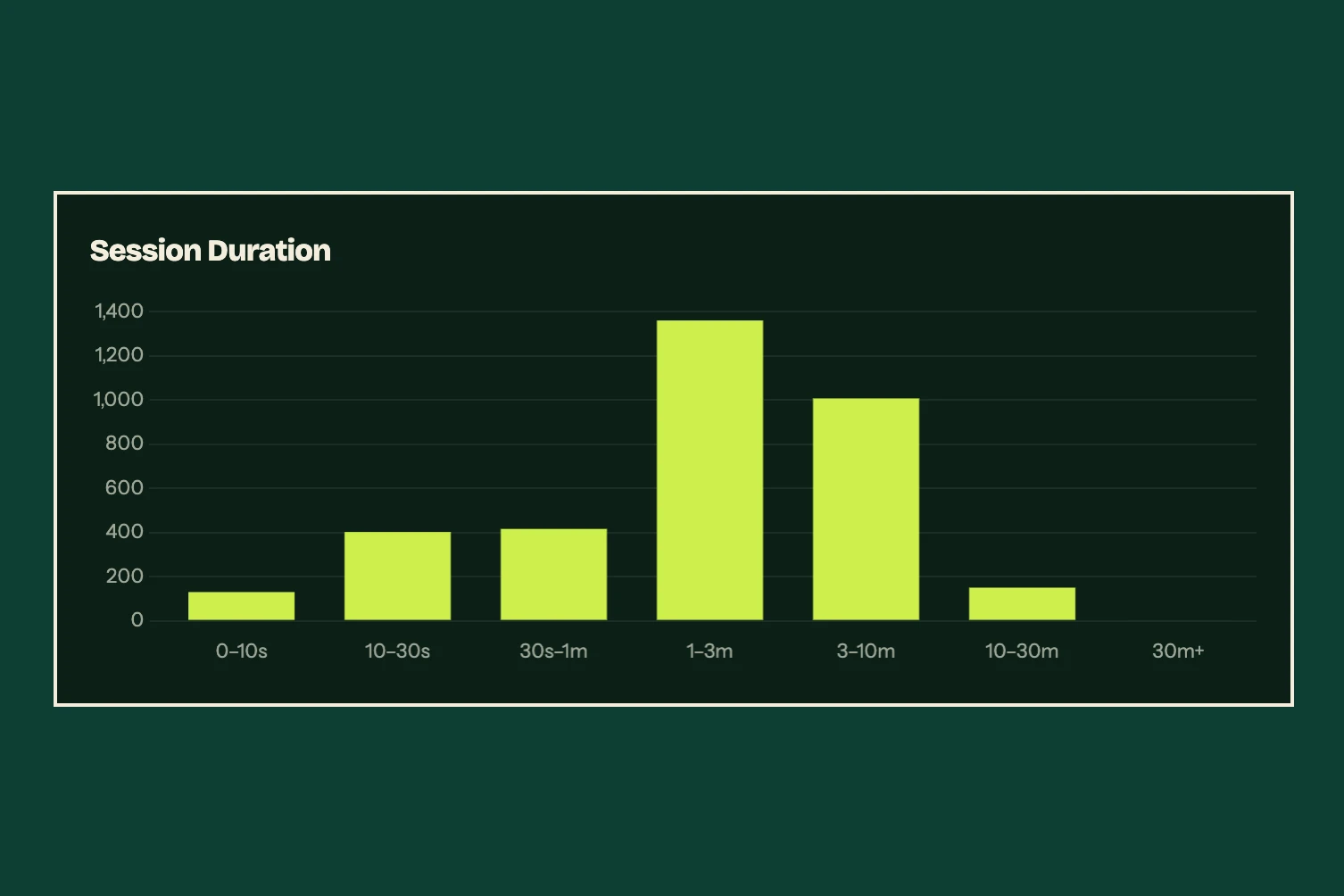
Is anyone actually using this?
Session counts over time, how long each one runs, and how many screens it reaches — as distributions, not averages, so a wall of ten-second bounces can't hide behind one long session.
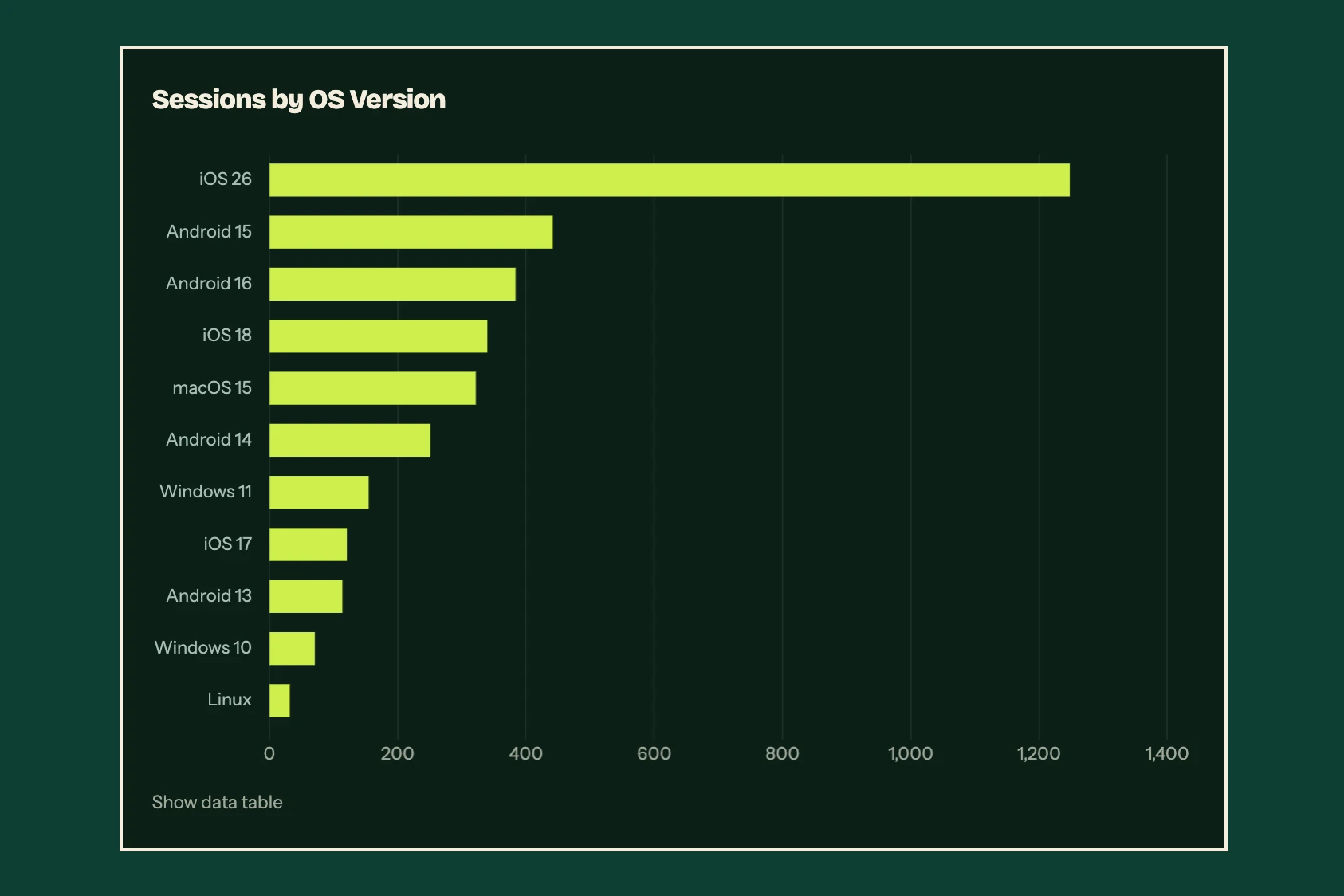
What should I test on before shipping?
Sessions broken down by platform, device class, OS version, region, and language. Enough to size a test matrix and retire an old OS. Not enough to fingerprint a device.
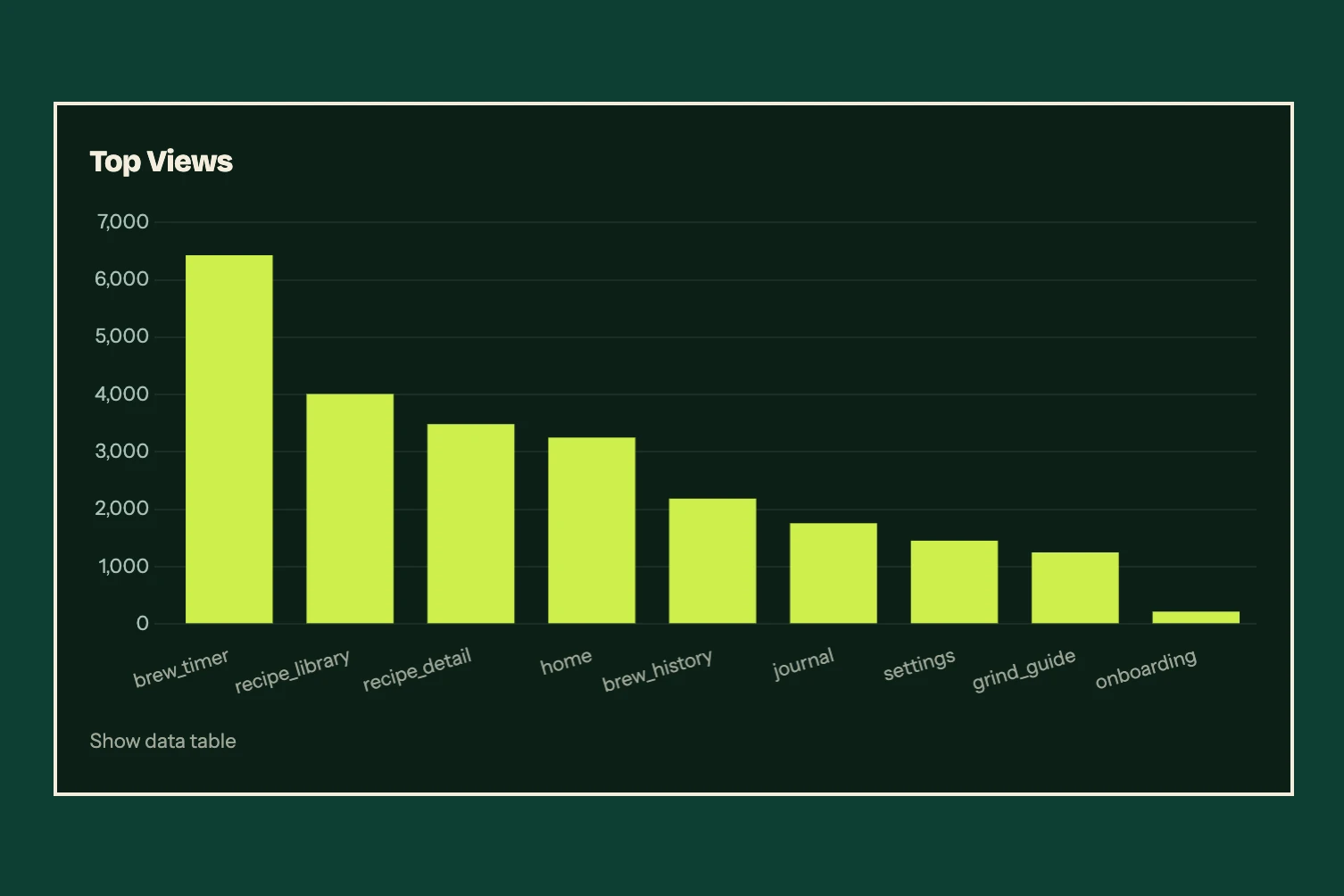
Which screens do people actually reach?
View counts per screen, with detail variants for sub-views shown as a donut. The screens you assumed were popular have to prove it.
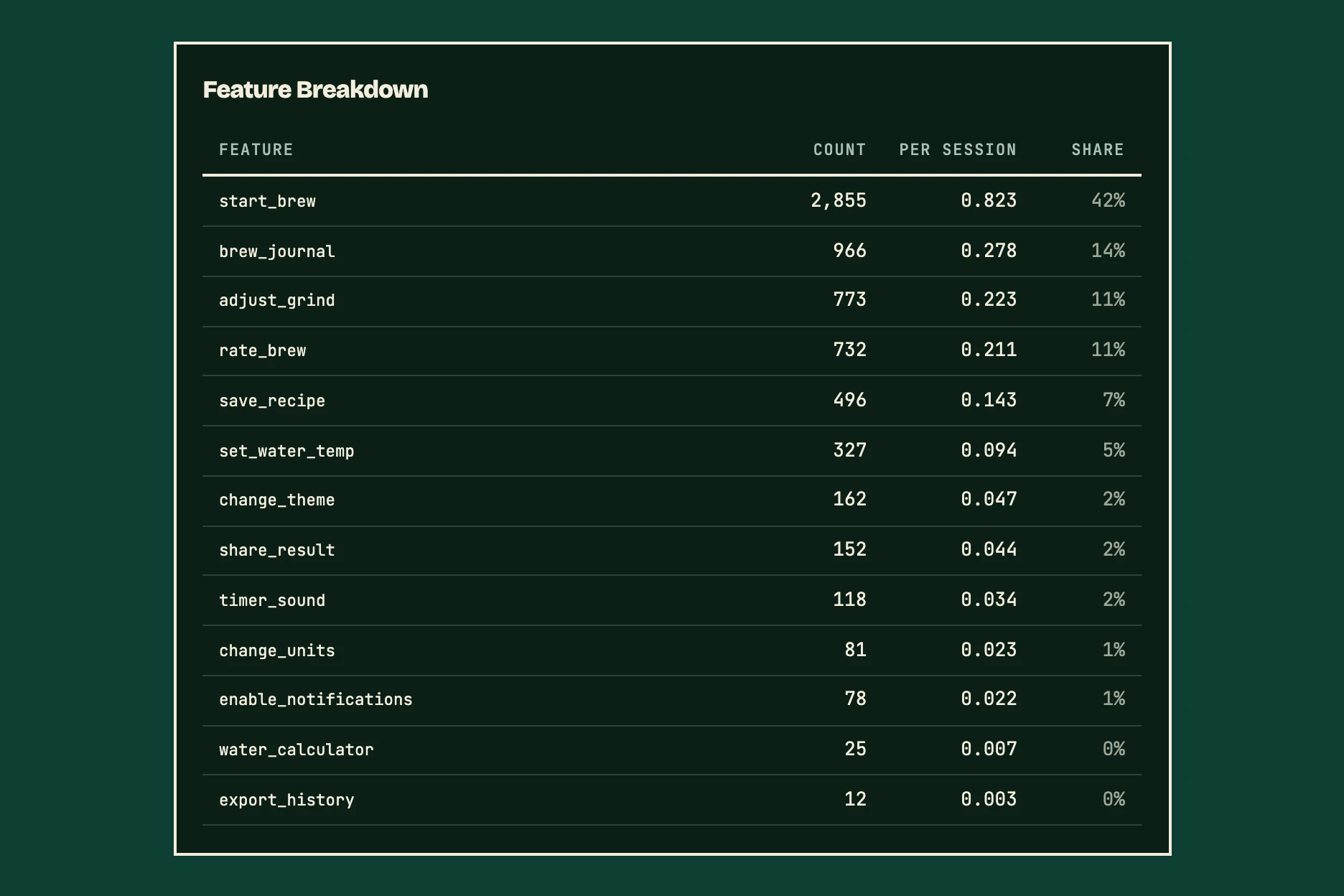
Would anyone notice if I cut this?
Session reach shows what share of sessions use each feature — normally a question that requires tracking individuals — next to how many times it is used per session. Detail variants split a feature into the options people actually picked, like theme.dark against theme.light. The numbers are yours to read.
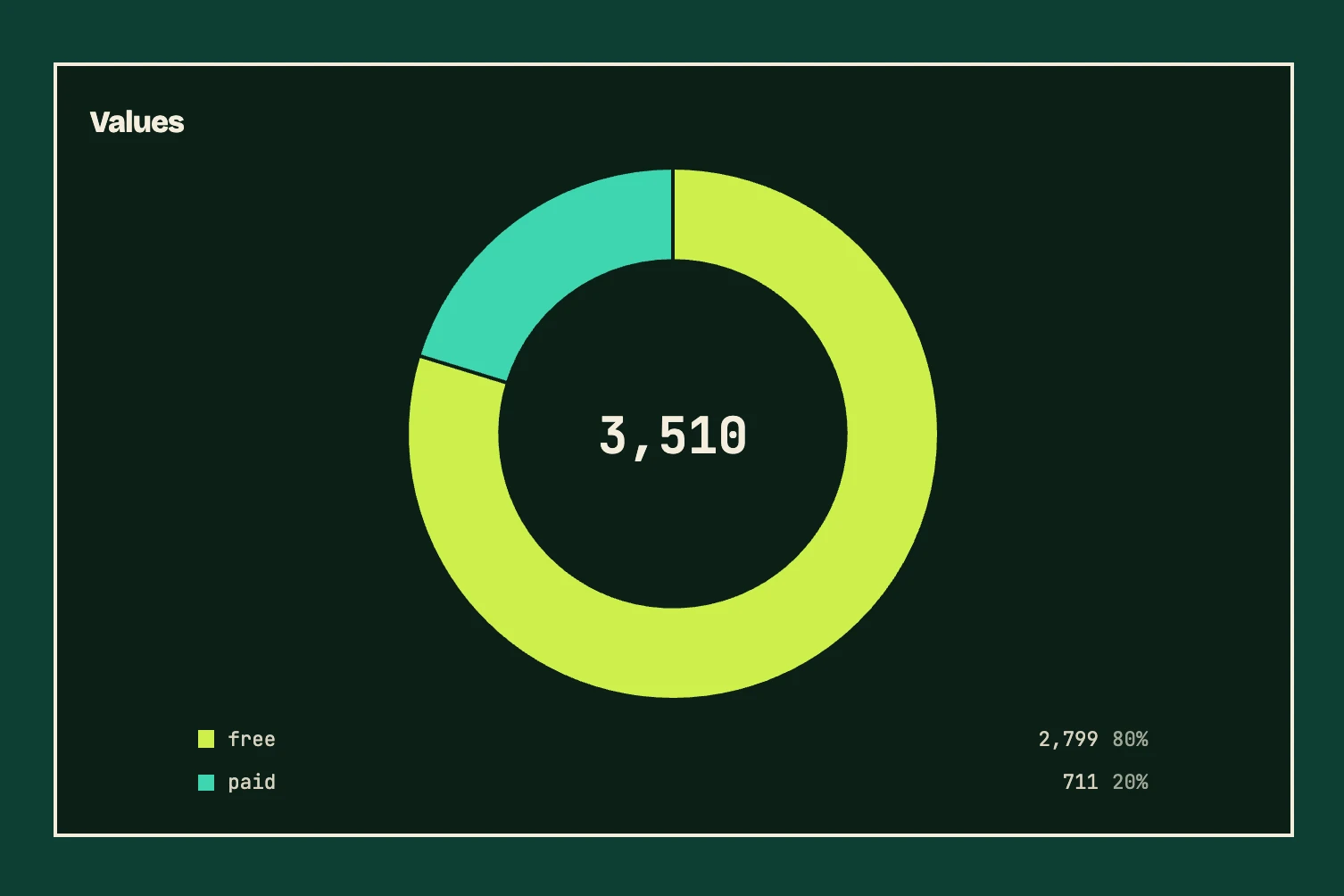
What do people have it set to?
info() counts a value the app reports about itself — plan, units, theme, a permission's state. Send it once per session and each value's count is its sessions. It never moves the error rate, and no value is ever attached to a person.
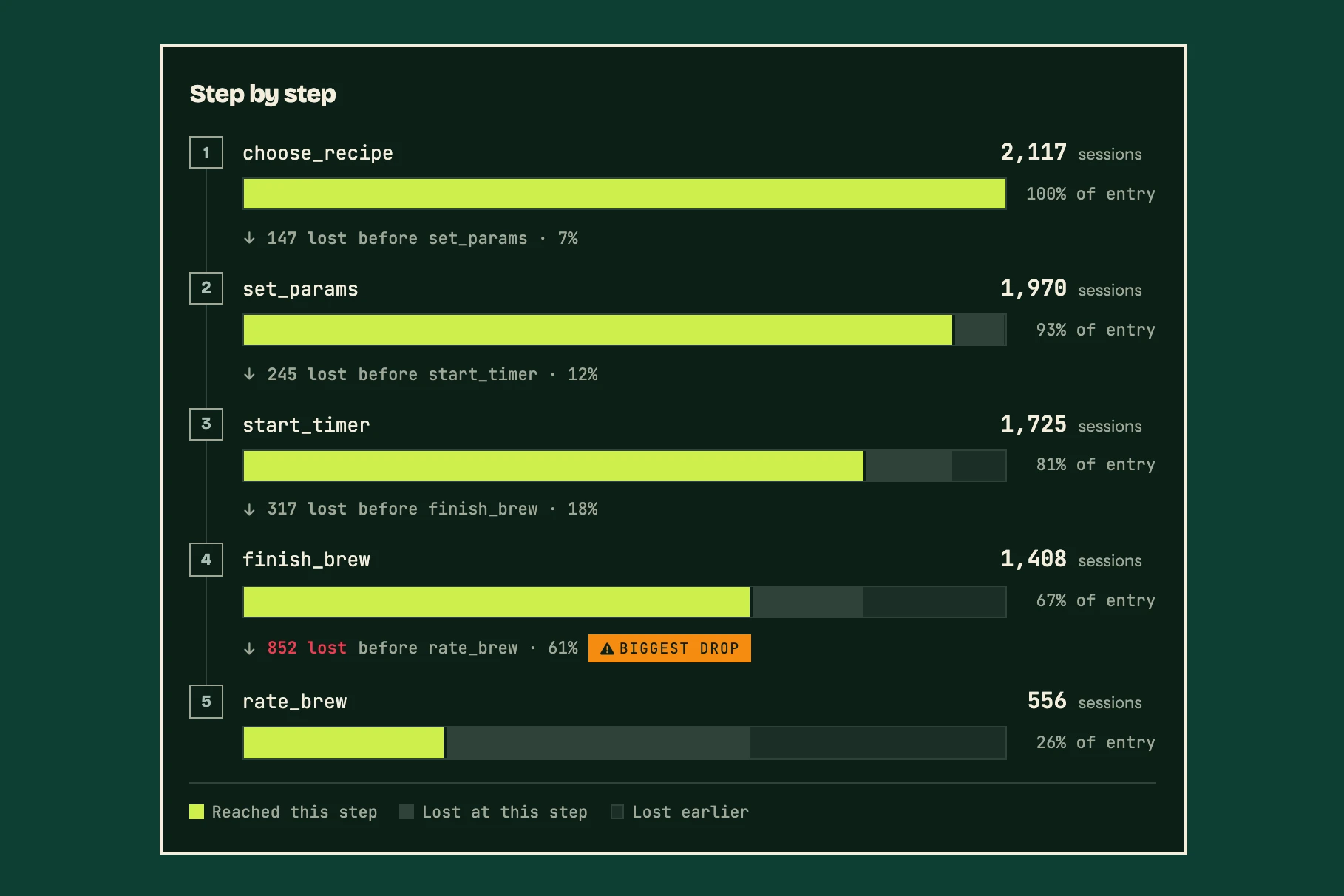
Where do people give up?
Step-by-step drop-off across any funnel you define, measured in aggregate. You find the step that loses people without following anyone through it.
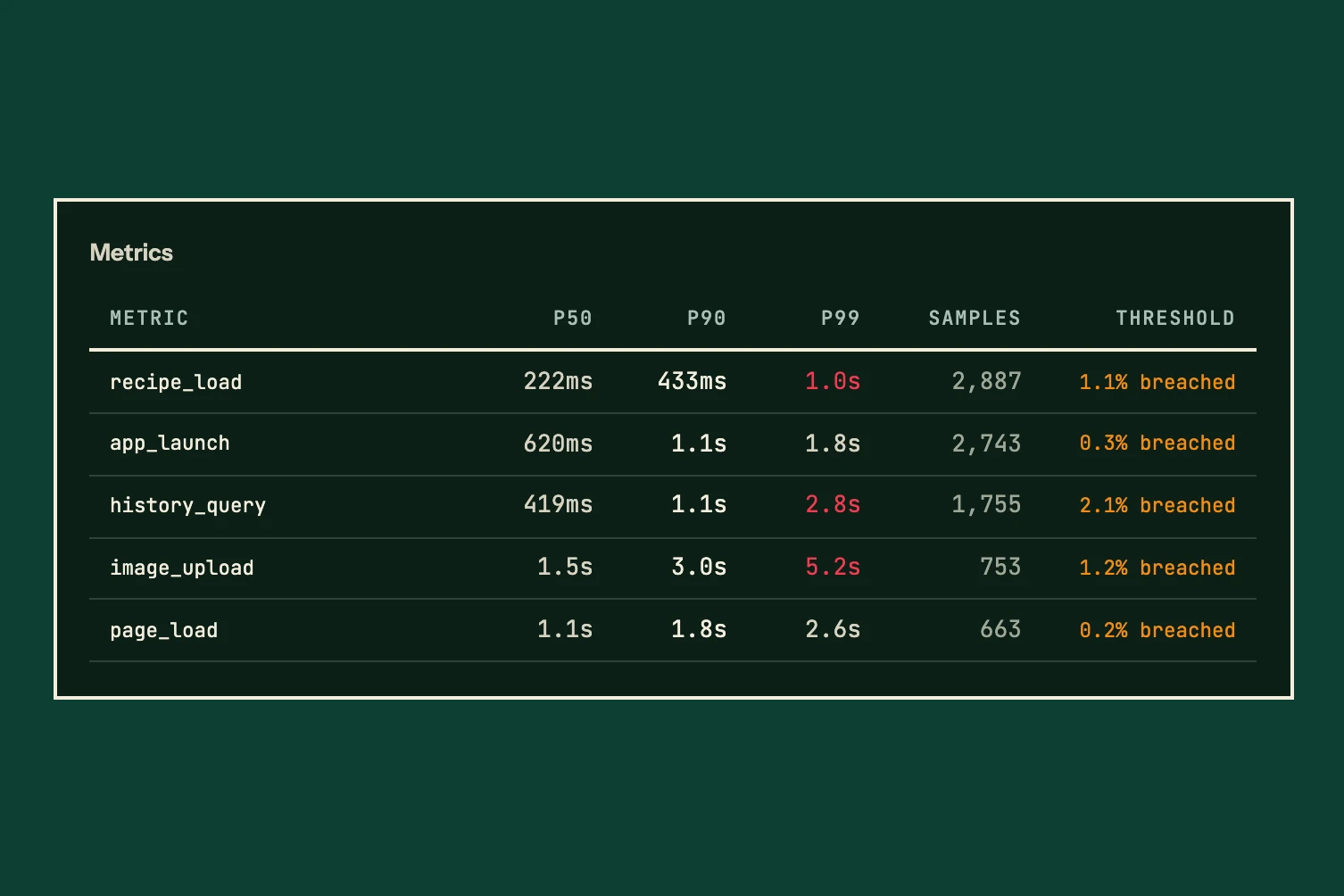
Is it slow for everyone, or just for some?
p50, p90, and p99 latency for any operation you time, with optional thresholds. The complaints come from the p99 — exactly the number an average hides.
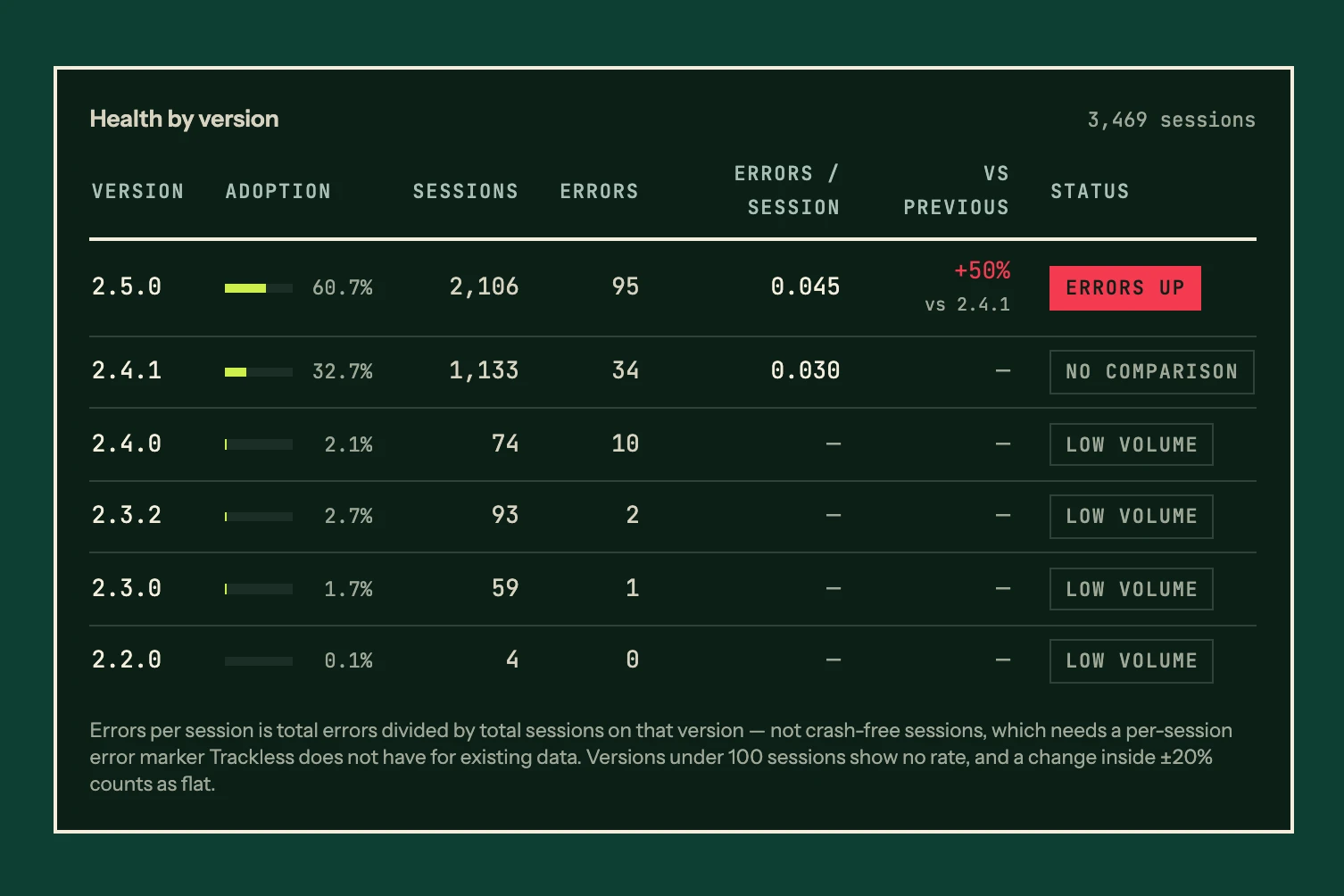
Did the last version break anything?
Errors per session by name and code, broken down by platform and app version — no stack traces, no user data. Anything that did not go wrong is counted separately, where it cannot move that rate.
Screenshots show the Trackless dashboard with an example app's data.
Telemetry that fits in a context window
The Agent pack page turns one app's production counts into a pack — press Copy for your agent, or Download for a markdown file — then paste it into whatever agent you already use. On every plan, Free included.
A number never travels alone
Every count arrives beside the traffic it happened in. Six errors in a week of twelve hundred sessions is a finding; "six errors" on its own is not.
Blank means unknown. It never means zero
"We could not measure this" and "this was zero" are opposite findings — and the second is the one a model will guess. The pack writes them differently.
A small number stays a small number
Two errors becoming six is a tripling, and it is also six errors — which cannot tell a real regression from a quiet week. The pack hands over both counts and the traffic behind them, and the instructions say not to quote the multiple.
Reach and heavy use are different questions
How widely a feature is reached and how heavily it is used are reported separately, and each is marked where it could not be measured — so "not measured" never reads as "nobody used it".
What was left out is disclosed, with its weight
A busy app has a long tail that will not fit, so the pack keeps the largest and says how many it dropped — and how much of the app they were. "412 more features, 9,840 uses between them" tells your agent whether it is holding most of the app or a third of it.
Trackless calls no model
Not on the server, not in the dashboard, nowhere. You pull the pack and paste it into an agent you run and pay for — no telemetry reaches any model vendor from our side, and you choose the agent. Once pasted, your aggregate counts sit with that service, under its terms. There is nothing personal in a pack, because there is nothing personal anywhere in Trackless — but it is still your data, leaving by your own action.
What we skip — and what we use instead
Every omission is a deliberate architectural choice. It is also why a whole app's production fits in a context window, and why a pack is safe to paste into any agent: nothing personal is in it, because nothing personal is anywhere.
{
  user_id: "usr_8f3a9b2c",
  device_id: "D4E92F1A-8B7C-...",
  ip: "203.0.113.42",
  user_agent: "Mozilla/5.0 (iPhone...",
  screen: "1170x2532",
  event: "export_clicked",
  session_id: "sess_7d2e..."
}
{
  name: "export_clicked",
  count: 3,
  context: {
    platform: "ios",
    deviceClass: "phone",
    osMajor: "18",
    region: "US"
  }
}
Hear about it before your users do
Alerts and a weekly digest, built from the same aggregate counts. Nothing to watch by hand: Trackless emails you when something moves, and stays quiet when nothing does.
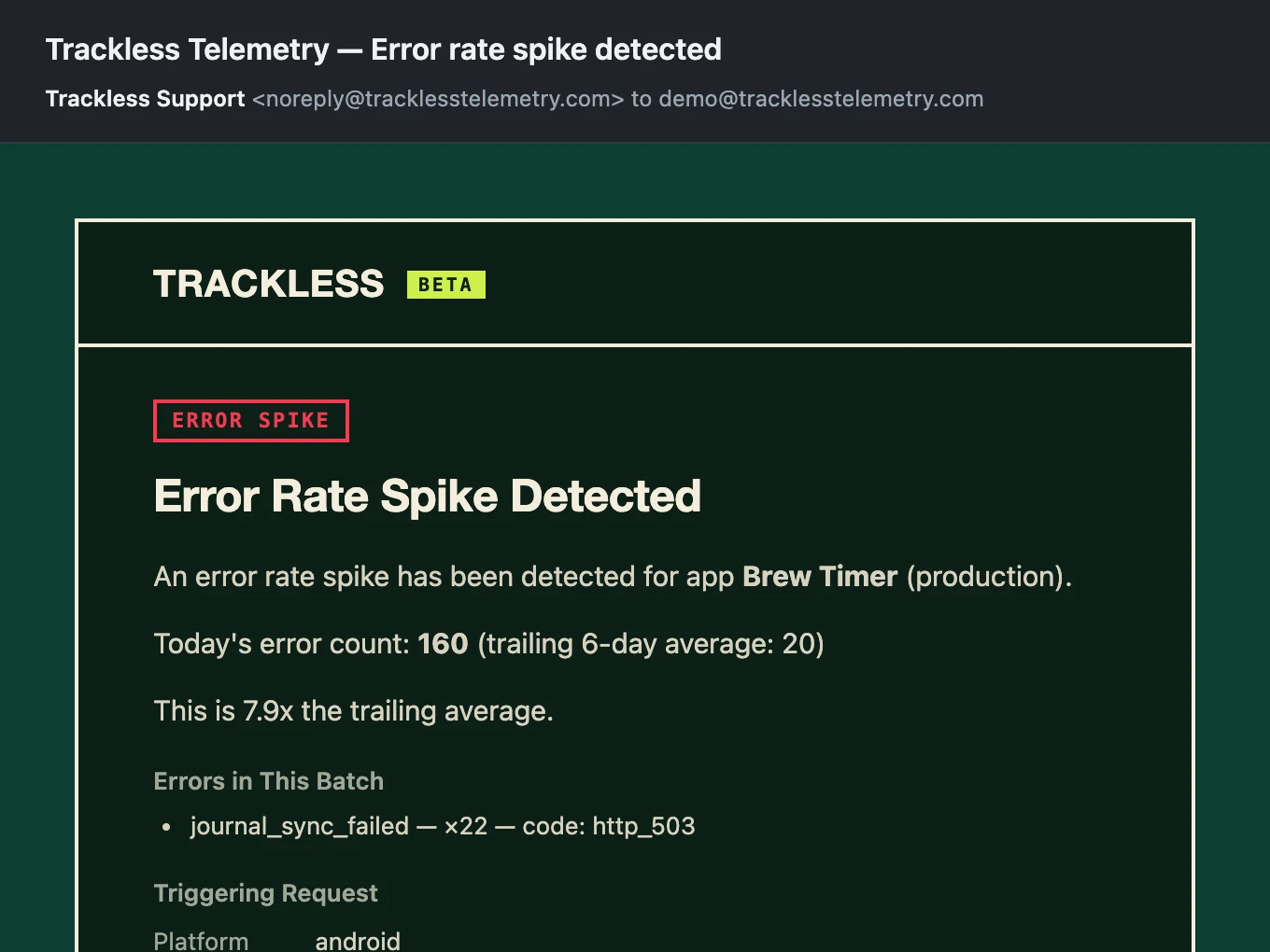
Error & Performance Alerts
Email when error rates climb, or when a timed operation crosses a threshold you set. These fire from the request that carried the problem, within seconds — you hear about a bad version while it is still rolling out.
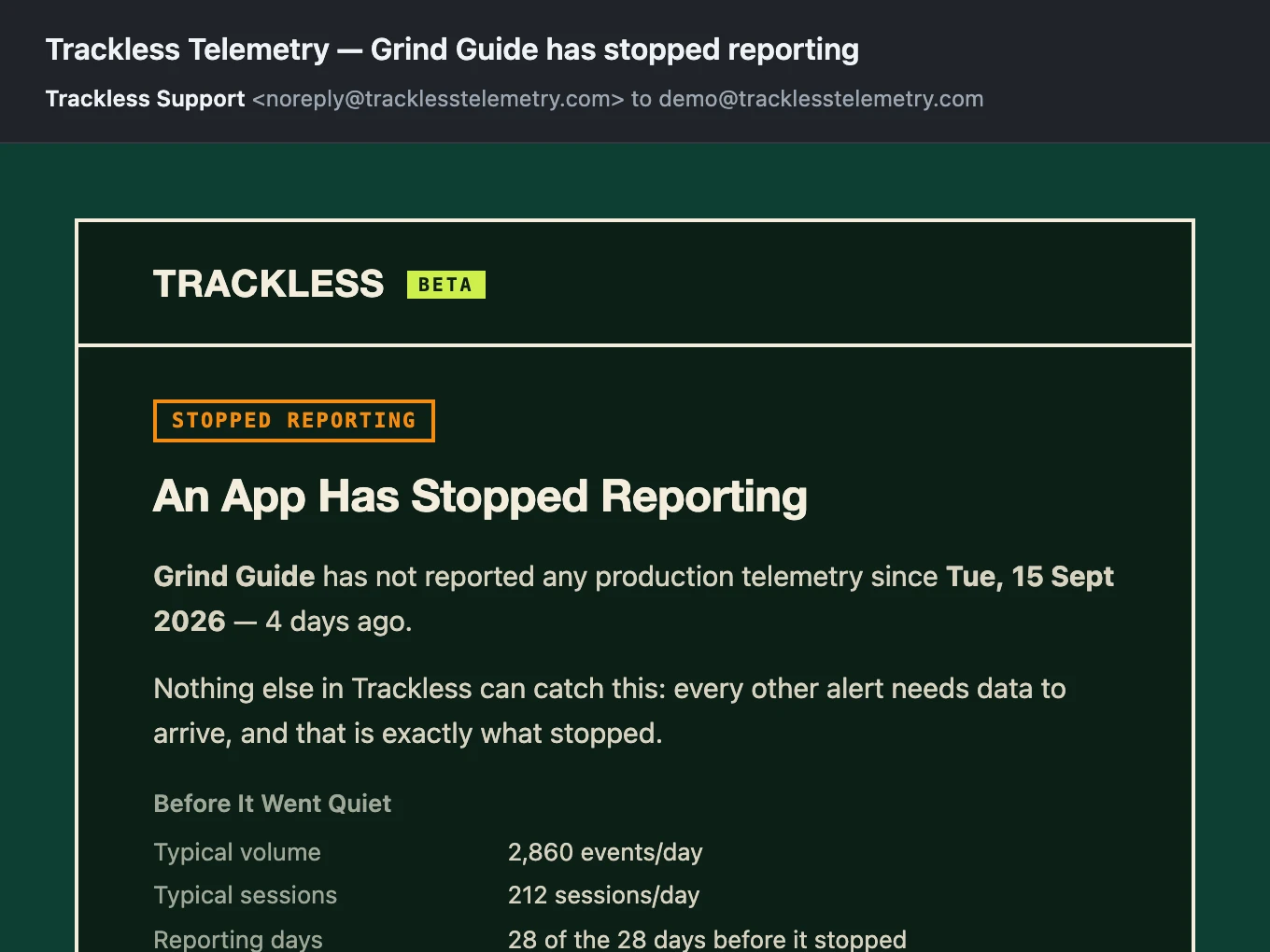
Silence Alerts
Nothing arrives when a build breaks, a key gets rotated, or the SDK stops flushing — and silence cannot trigger itself. So a scheduled check asks instead, and emails you when an app that was reporting has stopped. The threshold is that app's own longest previous gap: a weekly-cadence app has to beat its own record before you hear from us, with nothing to configure. The same check flags one other thing — a new version erroring more than the one it replaced.
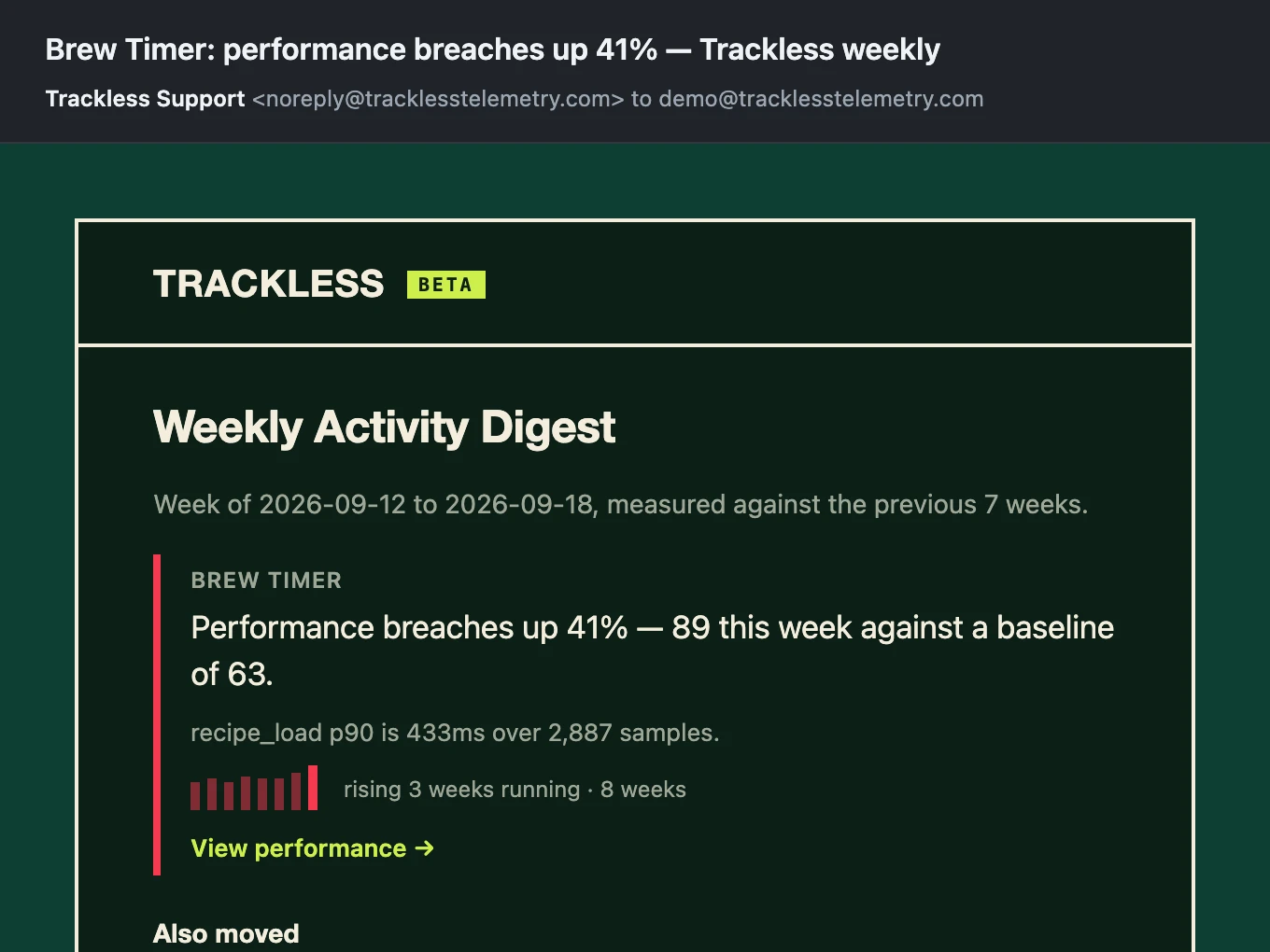
Weekly Digest
One email a week, opening with what actually moved. Every number is measured against its own baseline of up to seven prior weeks, in units of its own normal noise, so a metric that swings 40% most weeks is not news when it swings 40% again. A volume floor stops two errors becoming six from being reported as a tripling. A quiet week gets a short email, and the shortness is the point.
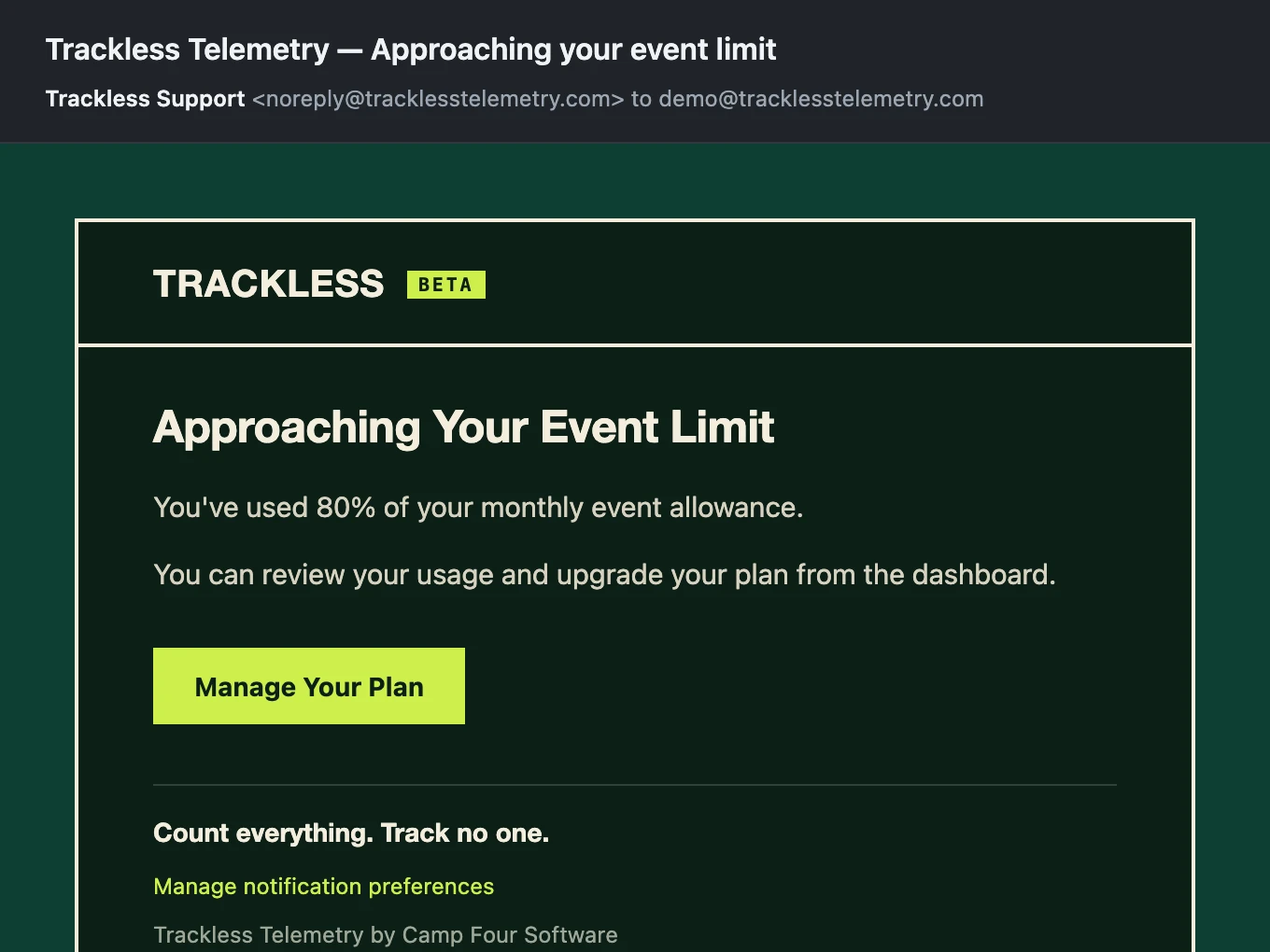
Usage Alerts
Automatic alerts at 80% and 100% of your monthly event limit. Stay ahead of quota without manual monitoring.
The real Trackless email templates, filled in with an example app's data.
What we can't answer
Four questions this architecture rules out. They are not on a roadmap — they need data we decided not to collect.
Marketing attribution
"Which campaign brought this install?"
Attribution needs a click ID or install referrer carried from the ad into the app. We never receive one, and there would be no identifier to join it to if we did.
DAU, MAU, and unique users
"How many people used the app today?"
Counting people means telling them apart. Every session arrives unlinked to every other one, so we can count sessions honestly and users not at all.
User paths and session replay
"What did this person do before they quit?"
Replaying one person's path means linking their events into a sequence. Nothing in storage ties two events to the same person.
Lifetime value and revenue
"What is a user from this channel worth?"
LTV ties revenue to a person over time. We collect no revenue data, and no person to tie it to.
None of these are gaps we plan to close. Storing no identifiers is what makes everything above safe to collect without a consent banner — these four are what it costs. And the pack says so as data, so an agent reading it cannot quietly invent them.
How we compare
Privacy-first doesn't have to mean feature-light.
| Trackless | Plausible | TelemetryDeck | PostHog | |
|---|---|---|---|---|
| Platforms | iOS + macOS + Android + Web | Web only | Apple platforms + Android + Web | Apple platforms + Android + Web |
| Feature analytics | Yes (aggregate) | Pageviews only | Yes (user-level signals) | Yes (user-level) |
| Conversion funnels | Aggregate funnels | Goal tracking | Yes (user-level) | Yes (user-level) |
| Performance metrics | p50 / p90 / p99 | No | No | Yes (user-level) |
| Error tracking | By name and code | No | Yes (preset) | Yes (user-level) |
| A/B testing | No | No | Yes | Yes |
| Retention / DAU / MAU | No | No | Yes (user-level) | Yes (user-level) |
| Data stored | Aggregate counts only | Aggregate counts | Individual signals | Full event logs |
| User identifiers | None (architectural) | Hashed IP | Hashed + salted user ID | Full user profiles |
| Consent required | No* | Varies | Varies | Yes |
* In most jurisdictions. See our privacy guide for details.
Is Trackless right for you?
Trackless is a different kind of analytics. Here's how to know if it's a good fit.
Trackless is great for
- Understanding which features get used and how often
- Deciding what production means — yourself, or with the agent that knows your code
- Measuring step-by-step drop-off at the aggregate level
- Monitoring app performance (p50/p90/p99 latency)
- Watching errors per session across app versions
- Shipping analytics without ATT prompts or consent banners
- Staying compliant without a dedicated privacy team
You might need a different tool if
- You need A/B testing with user-level segmentation
- You need to identify or contact specific users based on behavior
- You need anything on the can't-answer list — attribution, DAU/MAU, user paths, or LTV
Simple, volume-based pricing
All plans include the full analytics dashboard and the Agent pack. No overage charges and no automatic tier upgrades — pricing scales with your event volume and app count, and a plan only changes when you change it.
Free
- 100K events/month
- 2 apps
- All platforms (iOS, macOS, Android, Web)
- Full analytics dashboard
- Agent pack
Indie
- 1M events/month
- 5 apps
- All platforms (iOS, macOS, Android, Web)
- Full analytics dashboard
- Agent pack
- Team sharing
Studio
- 2.5M events/month
- 10 apps
- All platforms (iOS, macOS, Android, Web)
- Full analytics dashboard
- Agent pack
- Team sharing
Pro
- 5M events/month
- 25 apps
- All platforms (iOS, macOS, Android, Web)
- Full analytics dashboard
- Agent pack
- Team sharing
Max
- 20M events/month
- 50 apps
- All platforms (iOS, macOS, Android, Web)
- Full analytics dashboard
- Agent pack
- Team sharing
Enterprise
- Custom event volume
- Unlimited
- All platforms (iOS, macOS, Android, Web)
- Full analytics dashboard
- Agent pack
- Team sharing
- Custom SLA
Usage alerts at 80% and 100% of your limit. Sandbox events count toward your monthly limit on all tiers.
Building open source? Get our Indie tier free.
What happens when I reach the free limit?
Collection pauses, and nothing is billed. Usage alerts arrive at 80% and 100% of your 100,000 events. Trackless keeps recording for a further 10% past the limit, then turns new events away until your monthly allowance resets or you move to a paid plan from the dashboard. Every event call counts, including the session events the SDK records for you. There is no card on file to charge, and no plan upgrades itself.
Free for Open Source
Trackless is free for everyone up to 100,000 events per month. Qualifying open source projects get 10x that — our full Indie tier — completely free.
Eligibility
Public repository with an OSI-approved open source license, actively maintained with commits in the last 6 months.
What's Included
Our $9/month Indie tier at no cost — 1,000,000 events per month (10x the free plan), 5 apps, team sharing, all platforms, full dashboard access.
How to Apply
Email oss@tracklesstelemetry.com with your Trackless account email, repository URL, and a brief project description.
Three SDKs, one architecture
Native iOS, native Android, and web — the same typed event methods and the same zero-tracking, zero-persistence design in each.
Foundation-only, no IDFA/IDFV. Auto-detects sandbox vs. production from your build configuration.
Kotlin-first, no GAID/SSAID. Auto-detects environment from FLAG_DEBUGGABLE. On-device testing in progress.
Planned: an HTML script tag, React Native, Flutter, Vue, React, Node.js, Kotlin Multiplatform, Capacitor, Unity, and Python. Demand decides the order — tell us which you need.
Ship. Count. Ask your agent.
100,000 events per month, free. No credit card. No trial that quietly converts. Just start.